

Estimates built by hand take time
Adding items on a calculator, typing everything again in a chat and checking every amount.
In Orcela, your prices are saved and the total, with discount, is calculated instantly.
Estimate app for Android and iPhone
Build the estimate with your saved clients and prices, create a clean PDF and send it via WhatsApp or email. Then track each one until you get paid.
Free to start · 5 new estimates per month · Works offline

Why an estimate app
Adding items on a calculator, typing everything again in a chat and checking every amount.
In Orcela, your prices are saved and the total, with discount, is calculated instantly.
A chat message gets lost and doesn’t show the expiration date, terms or your business details.
Your client gets a clean PDF with your details, items, expiration date and terms.
Without tracking, last week’s estimate gets forgotten — and so does the job.
Every estimate has a status: sent, approved, in progress, paid. And the app flags expired ones.
How it works
All from your phone, on site or at the end of the day.

1Pick the client
Search your clients or add a new one without leaving the estimate.

2Build it with your prices
Pull services and products from your catalog, adjust quantities, add a discount and set the expiration date and payment method.

3Send it in seconds
Your client’s WhatsApp with the summary ready, a PDF for any app, email or text to copy.

4Track it until you get paid
Record approval, work in progress and payment. The history keeps every change.
Features
Everything below works on the free plan, with up to 5 new estimates per month.
Price catalog
Add what you do and what you charge once, per unit, hour, day, square meter, meter or job. In the estimate, just tap and adjust the quantity.

Clients
Phone, email and address saved. From the client’s card you can open WhatsApp, call or create a new estimate.

Tracking
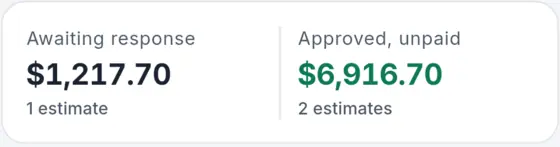
Draft, sent, approved, in progress, paid. The list shows the amounts awaiting a reply and approved to collect, and flags expired estimates.
Summary
Open and collected amounts, approval rate and a month-by-month chart. Free plan: last 6 months; Pro: 12 months.

Create and edit on site. It syncs when the connection is back.
Opens the chat with your client and the estimate summary ready.
Share the PDF by email, Drive, Telegram or whatever you prefer.
Reuse a similar estimate and change only what you need.
Pick the main color of the app and your estimates.
Follows your phone’s theme, easy on the eyes at night.
The result
This is a real estimate created by Orcela with sample data. It’s what your client gets on WhatsApp or by email.
On the free plan the footer says “Made with Orcela”. On Pro, the PDF carries only your brand.
Who it’s for
If you send estimates over WhatsApp, Orcela organizes the path to getting paid.
Outlets, breakers, panels and service calls priced per unit or per job.
Estimates per square meter, per day or per stage, with clear expiration and payment terms.
HVAC, plumbing, assembly and preventive maintenance, from request to payment.
Your business details on the PDF, organized clients and a summary of what came in each month.
Pricing
No card to start. You subscribe and cancel through Google Play or the App Store.
To start organizing your estimates.
Freeforever
7-day free trial
For those who send estimates every week.
Monthly or yearly plan, priced in your local currency on Google Play and the App Store.
Subscribe inside the app, under My account › Free plan. The app shows the price in your currency before you buy. Cancel during the 7-day trial and you won't be charged. The subscription renews automatically until you cancel: on Android, in Google Play › Payments & subscriptions; on iPhone, in Settings › your name › Subscriptions.
Transparency
What happens to your data and your money, explained in a few lines.
The app keeps everything on your phone so it works offline, and syncs with your account when there’s a connection. When you sign out, the data is erased from the device.
Orcela never asks for or stores card details. Subscription, receipt and cancellation stay in your Google or Apple account.
From the app or on the account deletion page, with your data removed from our servers.
How to delete your accountDeveloped by CupCakeLabs Tecnologia Ltda. Questions and support by email.
contato@cupcakelabs.com.brRead the Privacy Policy.
FAQ
Yes. On the free plan you create up to 5 new estimates per month and use clients, catalog, PDF, WhatsApp sending and the 6-month summary. The limit resets on the 1st of each month, and estimates you already created keep opening, editing and sending normally.
Monthly or yearly, with a 7-day free trial. The price is shown in your local currency on Google Play or the App Store and in the app before you buy. Pro unlocks unlimited estimates, removes the “Made with Orcela” line from the PDF and shows the 12-month summary.
On Android, in Google Play under Payments & subscriptions › Subscriptions. On iPhone, in Settings › your name › Subscriptions. Cancel during the 7-day trial and you won't be charged. After that, Pro stays active until the end of the period already paid.
Yes. Orcela is on the App Store for iPhone (iOS 15 or later) and on Google Play for Android. Use the same account on both and your estimates sync.
Yes. You create, edit and check estimates without a connection. When you’re back online, the app syncs with your account.
Via WhatsApp (the app opens the chat with the summary ready), as a PDF through any app on your phone, by email or as text to copy and paste. Your client doesn’t need to install anything.
The app and your estimates can be in English, Spanish or Portuguese, in US dollars, euros, pounds, Mexican, Colombian, Chilean and Argentine pesos, Peruvian soles, Brazilian reais and more.
Yes, anytime, in the app (My account › Delete account and data) or on the account deletion page linked in the footer. Deletion from our servers is immediate.
Email us at contato@cupcakelabs.com.br.
Free to start, with 5 new estimates per month. Install it, add your business and send your first PDF in a few minutes.
 Point your phone’s camera to download